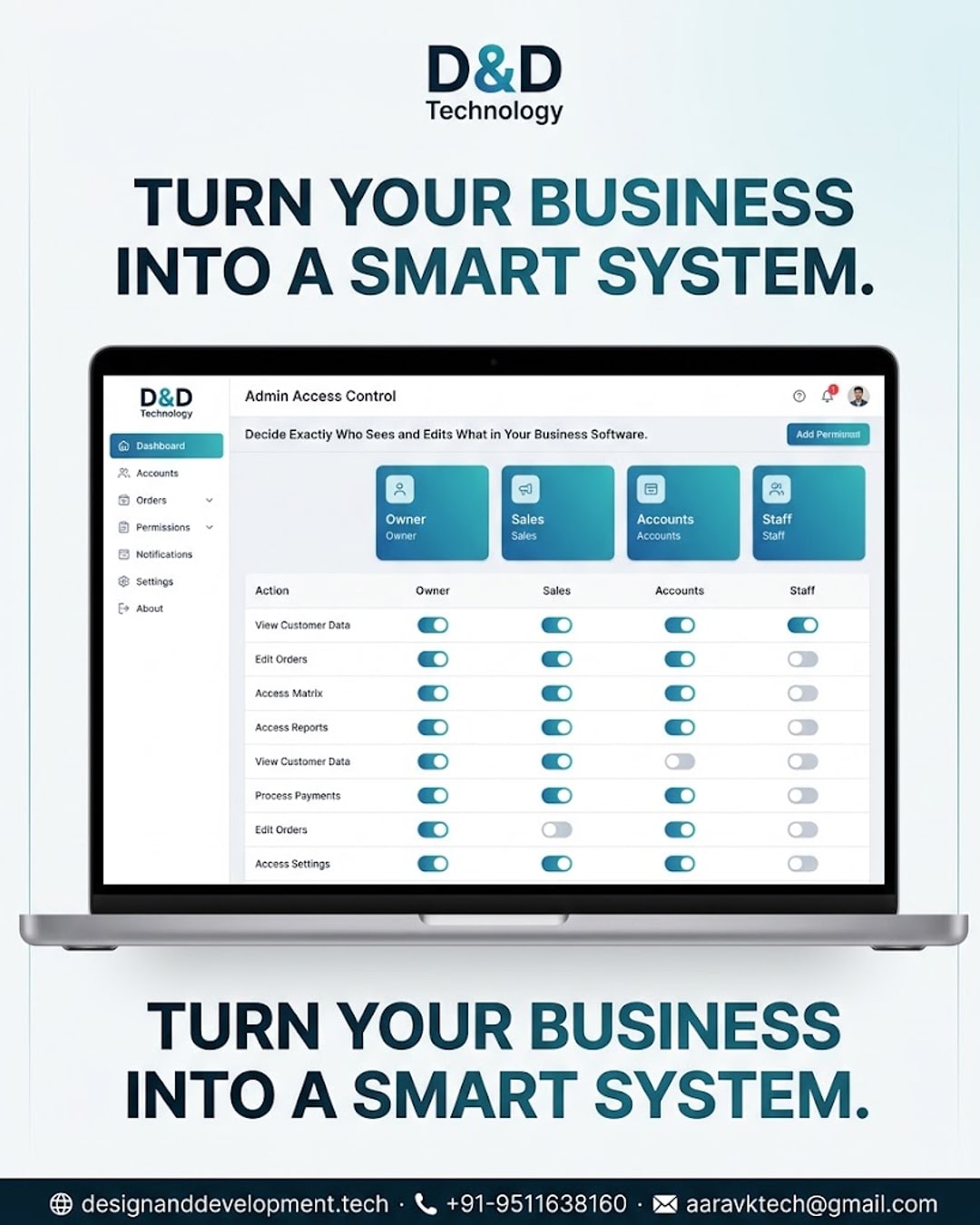
Who Actually Sees Your Business Data? The Access Control Question Most Owners Never Ask
Most business owners obsess over which software to build — sales dashboard, inventory tracker, CRM — but rarely ask a quieter, more important question: once it's built, who gets to see what inside it? If every employee logs into the same system with the same visibility, you've got a data problem hiding in plain sight.
Why Shared Logins Are a Silent Risk
When a sales executive, an accountant, and a warehouse staffer all use the same dashboard with identical access, you lose two things at once: privacy and accountability. Sensitive numbers like profit margins, supplier costs, or payroll become visible to people who don't need them — and if something goes wrong, there's no clear trail of who did what.
What Role-Based Access Control Actually Means
Role-based access control, often shortened to RBAC, is a simple idea with a big effect: each user is assigned a role, and that role determines exactly which screens, data, and actions they can access. A sales manager might see leads and follow-ups but not accounts. An accountant might see invoices and payments but not HR records. The business owner sees it all. Nothing is hidden by accident — it's designed that way from the start.
How D&D Technology Builds This In
When D&D Technology develops custom software, ERP, or CRM systems, access control isn't an afterthought bolted on later — it's part of the architecture from day one. We map out the roles in your business first: owner, manager, sales, accounts, staff, and anyone else who touches the system. Then we build permission layers so each role sees only what its job requires, with toggles an admin can adjust as the business changes.
Beyond Security: The Accountability Bonus
There's a side benefit most owners don't expect. Once access is role-based, every action in the system is naturally tied to a specific role and user. That means when a record changes or an order gets updated, you know who was responsible — no more guessing games between departments.
Is This Only for Large Companies?
No. It's easy to assume permission systems are an enterprise-only feature, but the truth is even a five-person business benefits the moment more than one person touches the software. A small retail shop with a cashier and a manager already has two roles that shouldn't see identical data.
My Take
If you're running software where everyone logs in with the same access, that's worth fixing before it becomes a bigger problem — not after. For a small team of 2-5 people, even a basic two-tier role setup (owner vs staff) is a meaningful upgrade. If you're managing 10+ employees across departments, it's worth investing in a proper role matrix from the start rather than retrofitting it later. Either way, this is the kind of feature that costs little to plan upfront and a lot to fix after a data mishap.
🌐 designanddevelopment.in · 📞 +91-7296994920 · 📧 aaravktech@gmail.com

Discussion0